
Petal to the medal
A lot has happened over the past few weeks, and we can’t wait to show you what we’ve been working on.
#Community
#Release

Daniele Rolli
May 01, 2026 • 10 min read
A lot has happened over the past few weeks, and we can’t wait to show you what we’ve been working on. In this not-so-monthly blog post, we’ll discuss version 4.4.0, the upcoming 5.0.0 beta (the successor to Beaver Pocket), our rebranding efforts, and how Beaver plans to turn a profit while staying true to its core values. We also have many exciting changes coming your way in the next few months.
A Little Spring Clean
Let’s start with some housekeeping: version 4.4.0 is now live. This release introduces a few bug fixes for the editor and folder system, along with security improvements and UI changes, such as the revamped notes menu and a new /today command (credits to @markd91). While this is a relatively standard stopgap release, it sets the stage for our focus on Beta 5, which we aim to have ready for migration in about a month.
Moving In With the Crabs
Last month, we asked the community whether switching to Tauri would be a good fit for Beaver. The response was overwhelming: 91% of poll participants wanted us to make the switch, and so we did. The Tauri branch is now stable enough for a beta release in the coming weeks.
Here’s the quick comparison: The current Electron-based bundle is about 500 MB on macOS, while the Tauri version is only 30 MB. When it comes to RAM usage, Electron consumes around 666.3 MB when opening a note, whereas Tauri uses roughly half that amount, at 345.6 MB.
Bundle size and RAM usage comparison between Electron and Tauri
Lower is better. Tests conducted on macOS 26.4.
Bundle size
RAM usage (opening a note)
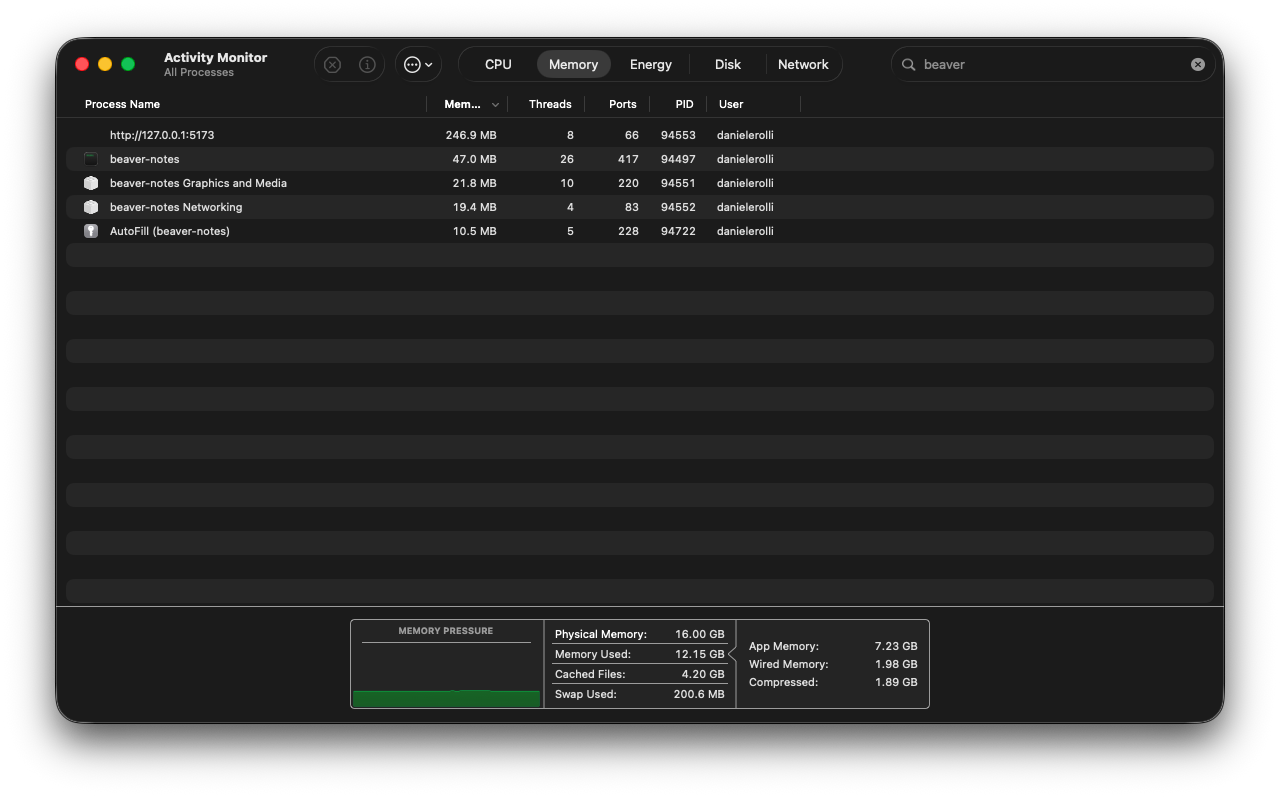
Tauri RAM usage
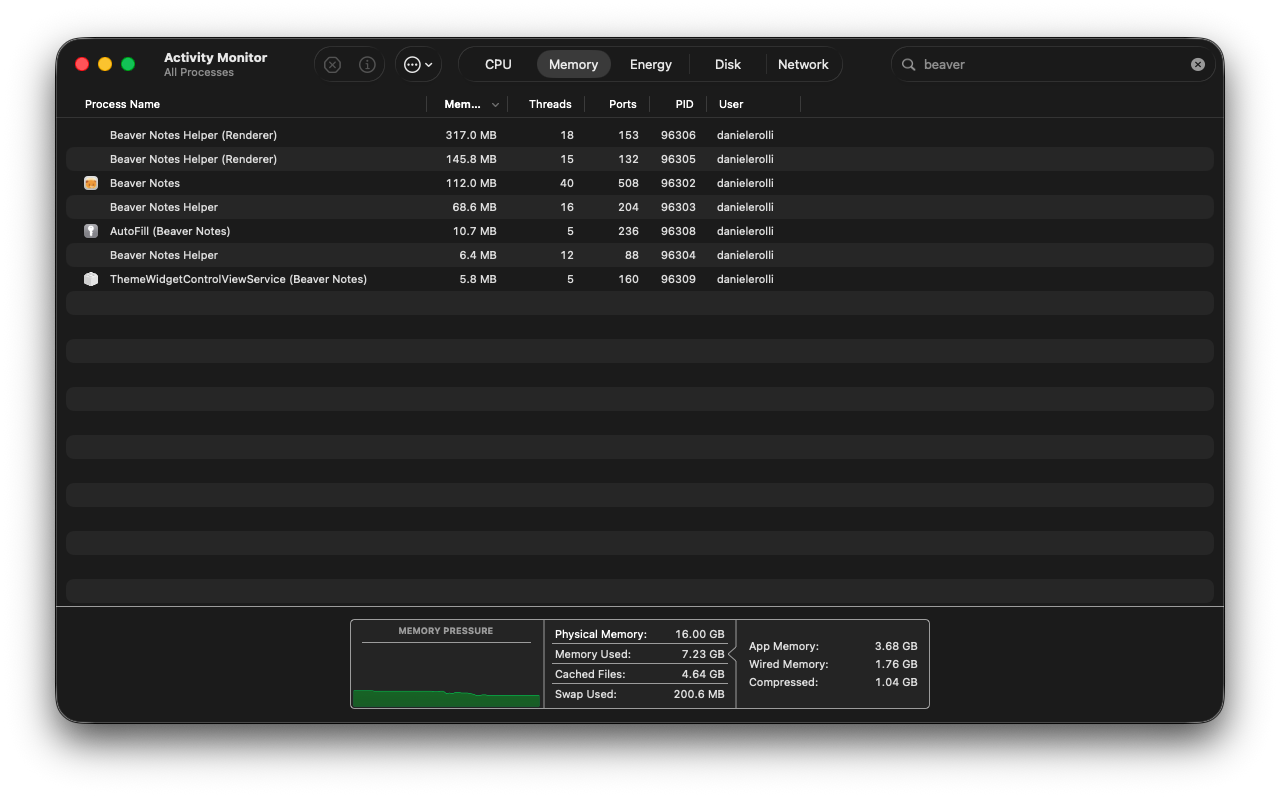
Electron RAM usage
Tauri also allows us to merge the desktop and mobile apps into a single codebase. This is why we’ve decided to archive the Beaver Pocket repository, which will be replaced by Beaver Notes. This change enables faster updates and ensures new features are available across all platforms from day one.
Bringing a Soul Back to Software
The first thing you’ll notice when opening the new Beaver is an animated onboarding experience that greets you and guides you through setup. Whether you’re coming from the Electron version or other apps like Notion, Apple Notes, Obsidian, Simplenote, Bear, or Evernote, the onboarding process will help you migrate your data and set up sync. It also walks you through sync setup and preference configuration if you were to choose to start fresh. We’ve even added a use defaults button so you can skip the onboarding entirely if you prefer.
Once you’re in, you’ll notice we’ve redesigned the folder system to feel more familiar and customizable. Folders can now be personalized with both colors and icons, and feature a hover animation that opens the folder and subtly shifts the documents inside up. Note cards have also received some attention, we have organized them in a Masonry grid, giving the content room to breathe. Talking about content cards now display image previews and icons for embeds, with all controls and metadata neatly tucked into a darker section at the bottom.
The command palette has been redesigned to show only the search bar, with results sliding in smoothly as you type. We’re also overhauling the settings menu, adding descriptions for each setting and organizing them into more logical categories. Also, images now wrap around paragraphs, a small but meaningful QOL improvement!
Overall, we are want to bring harmony and personality to Beaver’s UI with consistent corner radii and thinner borders, and a sprinkle of subtle animations.
Synchronization and Security
We’ve completely redesigned the sync model to be more secure, faster, and more reliable than ever. Here’s a quick analogy to illustrate the difference:
Imagine you have two notebooks, one at home and one at work. With the old model, every time you wrote something new, you’d have to manually copy all the pages from one notebook to the other. If you forgot to copy a page or wrote the same thing in both notebooks, you risked losing or mixing up your notes. There was no easy way to tell which version was the latest, and you had to remember to sync them yourself.
Now, imagine your notebooks automatically update each otherevery time you make a change. Each notebook keeps track of what was written and when, so if you edit the same page in both, it retains the newest version. Plus, it only updates what’s new, making the process faster and more efficient.
We’re also working on implementing encryption, both app-wide and for sync, covering notes and assets. This has proven to be a real challenge, not because we’re settling for “good enough,” but because we want encryption to feel like a seamless addition to security, not an add-on that compromises the user experience. If encryption slows down the app, most users would likely avoid it. Our goal is to make it almost imperceptible while maintaining maximum security.
Beaver Notes Beta Program
Beaver’s beta program will naturally open to everyone, and we’d really appreciate having you among the testers. That said, we also want to outline a couple of things regarding platform support and our roadmap.
Considering the complexity behind such an architectural shift, we want to build in a way that helps us ship swiftly and tackle bugs head-on. For that reason, we currently plan on releasing Beaver Notes Beta on desktop as follows:
- A universal DMG for macOS,
- x64 portable and setup for Windows,
- AppImage for Linux.
Let me be clear: These will not be the only supported platforms long-term. Beaver Notes will continue to support the same platforms it always has, especially on Linux. However, it’s extremely challenging to support four packaging methods (plus Flatpak) on Linux alone for a beta. AppImage allows us to ship fast and reliably. The same logic applies to Windows, although the ARM market is growing, it’s currently too small to warrant inclusion in the beta.
Moving on to mobile, we want to avoid repeating the mistakes we made with Beaver Pocket. Instead of trying to handle every platform at once, we’ll start by shipping for the iPhone first, then move to Android phones. After that, we’ll begin designing and optimizing the UI for Android tablets and iPads. The reasoning is simple, we already have a working version for the iPhone, while Android still has some library quirks we need to address. The biggest task is the UI, and once we’ve tackled it for iOS, much of that work will carry over to Android.
Monetization
It’s no secret that the core values of Beaver are opennes and privacy, thus we want to share all our ideas with our community. It’s also no secret that for a project to be valiable it needs funds, so we have cooked up a few ideas we have been workign on, well one we are working on the other is more of a proposal.
Beaver Cloud
We are working on introducing our own sync provider, Beaver Sync, which will coexist alongside the current sync options. Beaver Sync aims to be a cheaper and more secure platform for reliably syncing your notes across devices. It will use the same protocol and logic as the current sync but will communicate with an API instead of writing directly to a folder. This ensures we apply the same treatment to both paying and non-paying users.
We plan to split sync into two tiers: one for entry-level users and another for power users. We’re still finalizing the infrastructure and pricing details. Beaver Cloud will work in tandem with Beaver’s existing sync encryption. Our goal is not only to create a GDPR-compliant model for everyone, even those outside the EU, and also ensure we have zero knowledge of you or your data.
Beaver Cloud will also offer a time capsule feature, allowing you to restore notes from up to 30 days on the entry-level plan and up to six months to a year on the pro plan.
We’re staying true to our core design philosophy and we want no aggressive subscription pushes. You’ll only see the option to use Beaver Cloud during onboarding and in sync settings. You’ll never receive notifications, emails, or any commercial messages unless you’re subscribed, even then, you’ll only get emails for password resets or alerts when your storage is full, along with a single notification on your device. If you happen to run out of storahe, the choice is yours, you can opt out, upgrade or free up space.
Collaboration
A while ago, we proposed implementing collaboration. However, we realized that offering this for free isn’t feasible. Our solution is simple, introducing two additional plans on top of the existing entry-level and pro plans, entry-level with collaboration and pro with collaboration. We’re still working out the pricing, but the structure will be as follows:
- Entry-level (cheapest)
- Entry-level with collaboration
- Pro
- Pro with collaboration
These plans will cost a little more than the standard sync plan and will give users the ability to use collaboration features. If you or your friends have a Beaver plan, you can share notes and collaborate on them with people who don’t have a Beaver plan. However, only you, as the plan holder, will be able to invite people and manage the note, while the others will only be editors.
What the future holds
We have big plans for this year, and this is just the beginning. Here’s what we aim to implement before the end of the year:
Plugins
In Beta 5, we rewrote the logic of the editor toolbar to allow you to reorganize tools however you prefer. During this rewrite, we also included a feature that enables registering components both in the toolbar and in the / menu. This is significant because last year, we promised to deliver plugins, and we are determined to fulfill that promise. We plan to release a beta version of the plugin system in November, with full functionality available by December.
Plugins will operate exclusively within the editor, providing you with additional tools for writing from databases to graphs and much more.
Everyone will have the opportunity to develop and publish plugins for Beaver. Users will access these plugins through the Beaver Store and inside the app, a simple frontend for a GitHub repository where developers can submit their extensions. We will provide comprehensive documentation and APIs to support developers in building and publishing their plugins.
Improving drawing
The first few beta releases may not include a drawing component, as we’re still evaluating the best way to implement this feature. We’re considering options such as a standalone whiteboard or an embeddable whiteboard within notes, and we of course welcome ideas and feedback from the community. Our goal is to enhance the drawing experience with additional features, improved functionality, and support for images, among other enhancements.
Thanks to everyone 💖
Lastly, I want to express my deepest gratitude to every user, Beaver exists because of you. Your testing, problem reports, and contributions are what make it possible. If you’d like to get more involved, whether through feedback, documentation, or code, here’s how you can help: Get involved. Thank you for being part of this journey!

Comments
0 Comments